
Troubleshooting the Colour Bar & Scale
Tutorial 20.15: Troubleshooting the Colour Bar & Scale
⚠️ DRAFT — this tutorial is partly a placeholder. The battery and LiveWeightCard sections reflect live behaviour. The connection / pairing sections depend on the BLE pairing UI which hasn't shipped yet (Phase 3c). Sections marked DRAFT will be filled in once the Acaia Pearl driver is live.
Introduction
When the Colour Bar or scale misbehaves mid-appointment, you need a quick fix — not a long debugging session. This tutorial collects the common issues and their solutions in one place.
Who this is for: Anyone using the Colour Bar What you'll learn:
- Common scale connection issues
- Battery warnings and what they mean
- LiveWeightCard state messages
- The Capture-disabled reasons
- When to fall back to the main web app
Time to complete: Reference only — skim on demand
Scale won't pair (DRAFT)
Placeholder — see Tutorial 20.14 for the full pairing flow (DRAFT).
Provisional debug checklist when pairing fails:
- Is the scale charged? Low battery can block pairing
- Is the scale already paired to another device? Disconnect it first
- Has iPadOS granted Bluetooth permission to Luminate? Settings > Luminate > Bluetooth
- Restart the Colour Bar app (close, reopen)
- Restart the scale (off, on)
- Restart the iPad's Bluetooth (Settings > Bluetooth, toggle off / on)
Report persistent failures to support (hello@luminate.salon) with the iPad's iPadOS version and the scale's serial number.
Scale keeps disconnecting (DRAFT)
Placeholder — specific guidance pending the BLE driver.
Common factors:
- Range — most BLE scales want the device within 2–3 metres line-of-sight
- Interference — microwave ovens, strong wi-fi routers, and other Bluetooth devices can disrupt BLE
- Battery — below ~20%, scales become unreliable before fully dying
- Idle sleep — the scale may sleep after inactivity; placing a bowl on it typically wakes it
The battery indicator is amber
The battery indicator in the header turns amber at 20% or less. At this level:
- Pairing typically still works
- Live weighing is usually fine
- Plan to recharge the scale before your next appointment
Below ~10%, the scale's own low-battery behaviour kicks in (depending on model) — it may refuse to connect, shut off mid-weigh, or read unreliably. Don't start a new colour on a critically low scale.
LiveWeightCard says "Scale disconnected"
The status strip across the top of the LiveWeightCard tells you the scale's state at a glance — Scale disconnected, Reading (paired, weight still settling) or Stable (safe to capture) — and the battery indicator turns amber when charge is low.
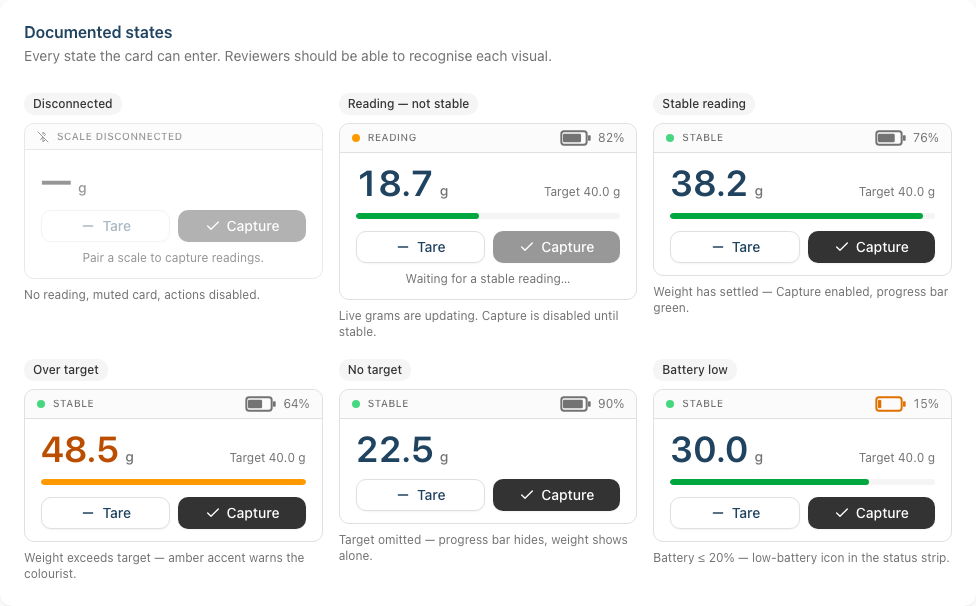
The hint text in the LiveWeightCard tells you what to try:
"Pair a scale to capture readings."
No scale has been paired in this session. Pair one (Tutorial 20.14).
"Place the bowl on the scale to read the weight."
The scale is paired but showing 0 g or no reading. Place the bowl on it.
"Waiting for a stable reading…"
The scale is paired and weighing, but the reading is still fluctuating. Give it a moment.
If the disconnected state persists despite a paired, battery-healthy scale, try:
- Re-tare via the Tare button
- Lift the bowl, wait for the scale to zero, replace
- Restart the Colour Bar app
Capture is disabled — why?
Capture is disabled whenever any of the following are true:
- Scale is disconnected
- No reading yet (the weight display shows —, nothing on the scale yet)
- No stable reading (the indicator shows Reading, not Stable)
The hint text underneath the Tare / Capture buttons tells you which one applies. Tare and re-capture usually resolves the typical cases.
"Leftover heavier than dispensed" warning on Reweigh
"A bowl's leftover is heavier than what was dispensed into it — re-tare and weigh just the product, not the bowl."
You entered a leftover weight larger than the amount originally dispensed into that bowl — which is impossible, so the bowl was almost certainly weighed without taring. Causes:
- Didn't tare before weighing the leftover
- Weighed bowl + leftover without taring the empty bowl first
- Pulled the leftover from the wrong bowl
Re-tare, weigh just the product (not the bowl), and re-enter the affected bowl's leftover. The warning clears when the numbers make sense.
The Colour Bar is slow or unresponsive
First-line checks:
- Is the iPad's wi-fi connected? The Colour Bar is a live web app
- Is it low on storage? Clear unused apps
- Has the app been open for days? Close and reopen
If the Colour Bar stays unresponsive during a busy colour session, fall back to the main web app's formula dialog (Tutorial 20.6) on any other device — the data is identical.
I accidentally put the iPad into App mode
From the Colour Bar footer, tap Switch mode, then pick Colour Bar again. The choice persists (localStorage) so the iPad stays on Colour Bar next time.
I've finalised the wrong formula
Don't panic — formulas are non-destructive:
- Open the appointment's Colour Formulas panel on the main web app
- Click Revert on the wrong formula (while the transaction is still a draft)
- Re-finalise with the correct actuals
If the transaction has already been completed, Modify the transaction (Tutorial 8.2) to reopen the formula.
Nothing I try fixes it — what next?
- Note the time, the appointment, and what you saw
- Fall back to the main web app's formula dialog (Tutorial 20.6) so the client isn't kept waiting
- Report to support at hello@luminate.salon with the details
We'd rather you finish the client's colour and tell us afterwards than spend the appointment troubleshooting.
Related Tutorials
- Tutorial 20.9: Colour Bar Overview and Setup
- Tutorial 20.10: Colour Bar: Day-to-Day Use
- Tutorial 20.12: Colour Bar: Mixing with the Scale — the LiveWeightCard source
- Tutorial 20.13: Colour Bar: Reweighing Leftovers — "leftover heavier than dispensed" warning source
- Tutorial 20.14: Pairing Your Acaia Pearl Scale (DRAFT)
- Tutorial 20.6: Creating a Colour Formula — fallback via web app
Last Updated: April 2026 — DRAFT placeholder, battery / LiveWeightCard sections are accurate; pairing sections pending BLE driver