
Seasonal Planning and Special Events
Tutorial 17.5: Seasonal Planning and Special Events
Introduction
Every salon experiences peak periods - Christmas, prom season, wedding season, and local events that drive demand. Proper planning for these busy times ensures you can serve more customers while maintaining quality and avoiding burnout. This guide covers how to prepare for peak periods and special events using Luminate.
Planning ahead for busy seasons helps you maximise revenue, manage staff effectively, set appropriate customer expectations, and maintain the service quality your clients expect.
Who this is for: Owners and Managers responsible for business planning and operations.
What you'll learn:
- Identifying and preparing for peak periods
- Managing increased booking volume
- Adjusting staff schedules for busy times
- Handling holiday closures and bank holidays
- Planning marketing campaigns around events
- Setting up special event packages
Time to complete: Variable (planning should start 6-8 weeks before peak periods)
Prerequisites
Before you begin, make sure you have:
- Access to Luminate with Manager, Admin, or Owner permissions
- Historical data from previous peak periods (if available)
- Understanding of your local market and key dates
- Team input on availability during peak periods
Step-by-Step Instructions
Step 1: Identify Your Peak Periods
Start by mapping out the key busy times for your salon.
Common peak periods for UK salons:
| Period | Typical Dates | Key Events |
|---|---|---|
| Christmas | Mid-November to 24 December | Parties, family gatherings |
| New Year | 27 December to 31 December | NYE celebrations |
| Valentine's Day | First two weeks of February | Romantic occasions |
| Easter | 2-3 weeks before Easter weekend | Spring refresh |
| Wedding Season | April to September | Bridal parties |
| Prom Season | June and July | School leavers |
| Back to School | Late August to early September | Fresh starts |
| Halloween | Last two weeks of October | Costume events |
Local factors to consider:
- Major local festivals or events
- University term dates (student areas)
- Corporate calendar (business districts)
- Sports events or concerts
- School half-terms
Review historical data: If you've been using Luminate for more than a year:
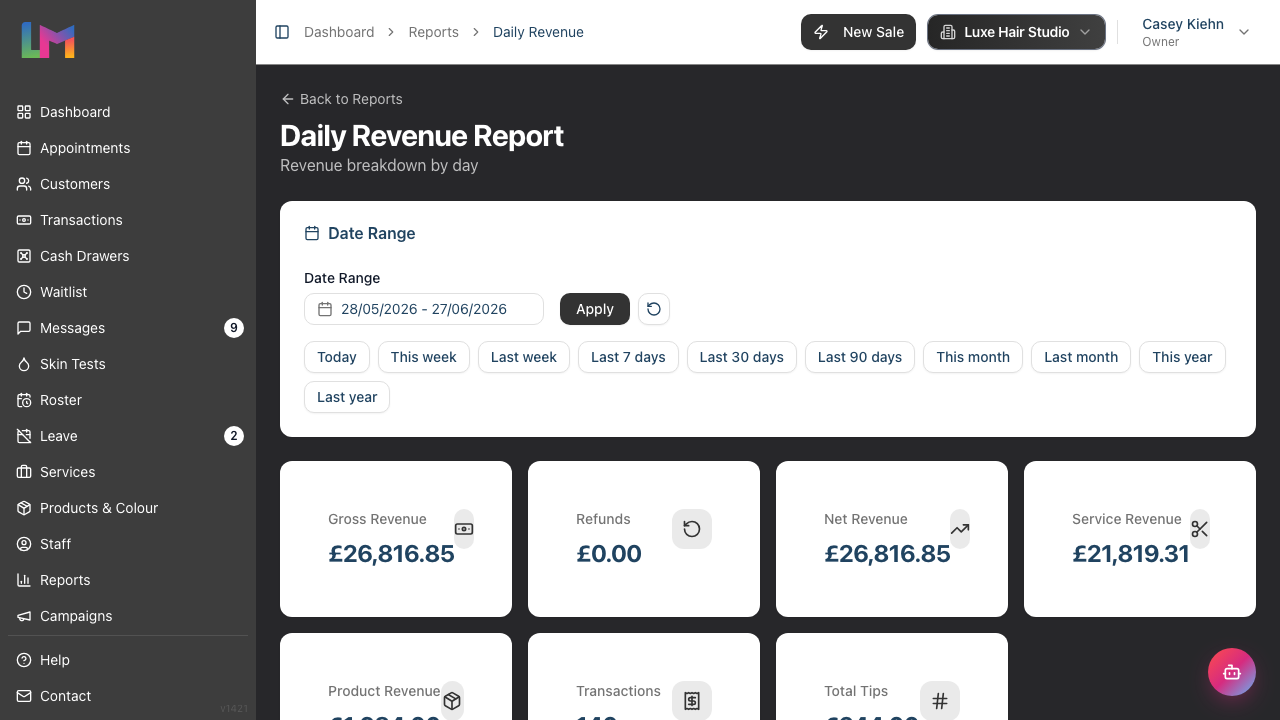
- Go to Reports > Daily Revenue
- Use the date-range filter to set previous peak periods
- Compare with normal weeks
- Note: revenue increase, appointment volume, busiest days
Step 2: Plan Staffing for Peak Periods
Adequate staffing is essential for handling increased demand.
6-8 weeks before the peak:
- Click Roster in the sidebar menu
- Navigate to the peak period dates
- Review current roster coverage
- Assess gaps based on expected demand
Staffing strategies:
| Strategy | When to Use |
|---|---|
| Extended hours | If demand exceeds normal capacity |
| Additional shifts | Staff willing to work extra |
| Temporary staff | Very busy periods like Christmas |
| Reduced breaks | Short-term only, with staff agreement |
| Cancelled leave | Only as last resort, with compensation |
Communicate with staff early:
- Discuss expected busy periods with your team
- Ask for availability and preferences
- Consider incentives for working peak shifts (bonus, extra leave)
- Give plenty of notice for roster changes
Create the roster:
- Build rosters for peak weeks in advance
- Ensure coverage matches expected demand
- Build in buffer for late bookings
- Plan for staff wellbeing - avoid excessive consecutive shifts
Step 3: Manage Holiday Closures and Bank Holidays
Luminate helps you handle days when your salon is closed.
Reviewing bank holidays:
- Click on your salon name in the header to open the dropdown menu
- Select Salon Settings
- Click the Staff tab
- Click the Public Holidays sub-tab
- Review which holidays are configured for your salon
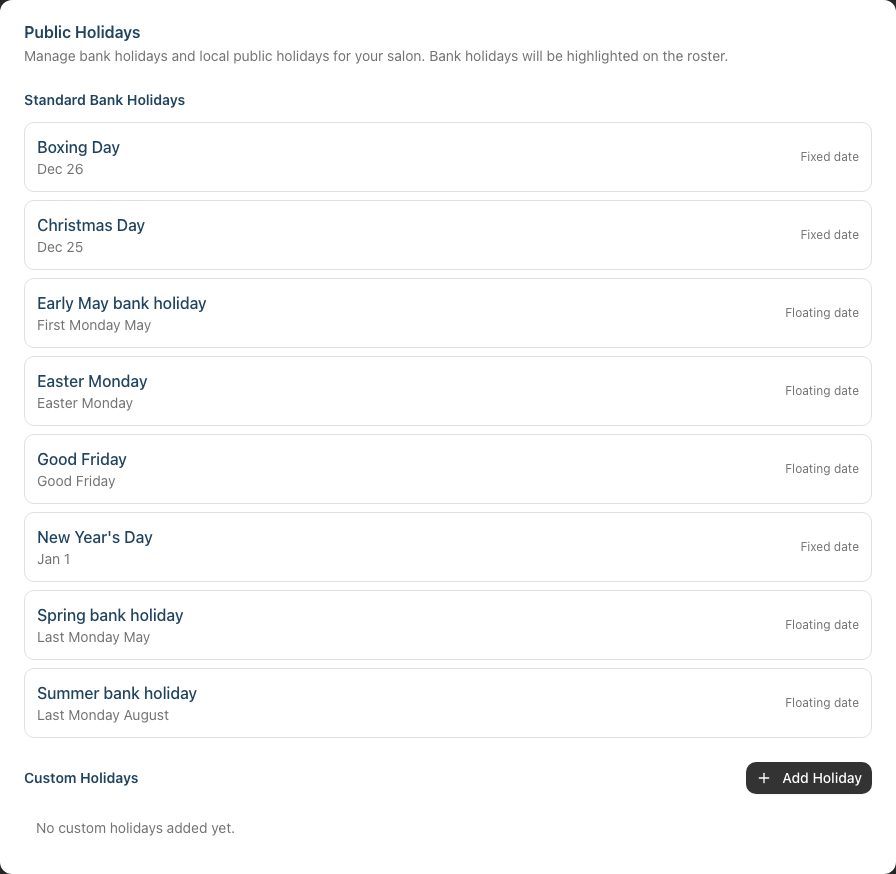
Understanding bank holiday features:
- Bank holidays are highlighted on the roster with a striped marker on the affected day
- When you try to create a shift on a bank holiday, Luminate shows a Bank Holiday Warning dialog
- You can choose Proceed Anyway to roster staff (if you're open on holidays) or Cancel to skip
If you're closed on a bank holiday:
- Don't roster any staff on that date
- Consider adding a note to your booking page (if using online booking)
- Review appointments that might be affected - were any booked before you decided to close?
If you're open on a bank holiday:
- Acknowledge the warning when creating shifts
- Consider premium rates or incentives for working
- Confirm with staff they're available
Custom holiday closures: For days not in the bank holiday list (e.g., your salon's anniversary, staff training days):
- Navigate to Salon Settings > Staff > Public Holidays
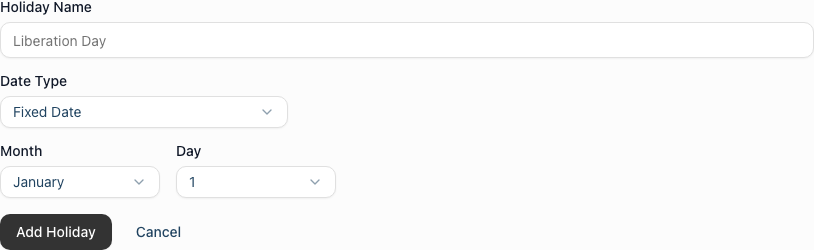
- In the Custom Holidays section, click Add Holiday
- Enter a Holiday Name, then set the Date Type — choose Fixed Date (a specific month and day, e.g. 25 December) or Floating Date (a rule such as the last Monday in August)
- Click Add Holiday to save
- Custom holidays warn staff when rostering, just like bank holidays
Step 4: Prepare for Increased Booking Volume
When demand exceeds supply, you need systems to manage it fairly.
Deposit requirements: During peak periods, consider requiring deposits to reduce no-shows:
- When booking or editing an appointment, enter a value in the Deposit Amount field
- Deposits appear on appointment cards in the calendar, marked Deposit Paid or Deposit Due
- This secures bookings and compensates for blocked time if cancelled
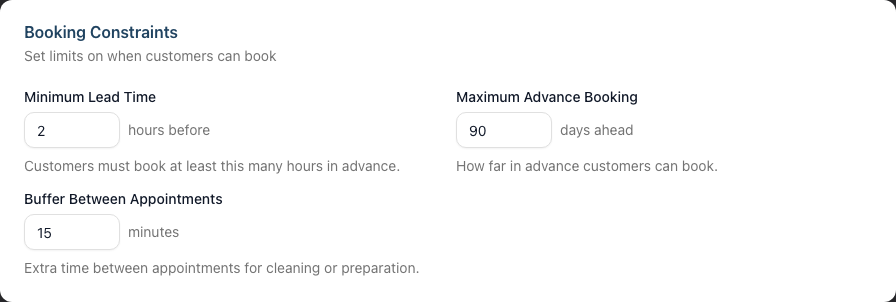
Lead time adjustments: If you use online booking, you can adjust the booking window under Salon Settings > Online Booking > Booking Constraints:
- Maximum Advance Booking - how far ahead (in days) customers can book; lower this to stop people booking too far out
- Minimum Lead Time - how many hours' notice a booking needs; raise this to give yourself buffer for preparation
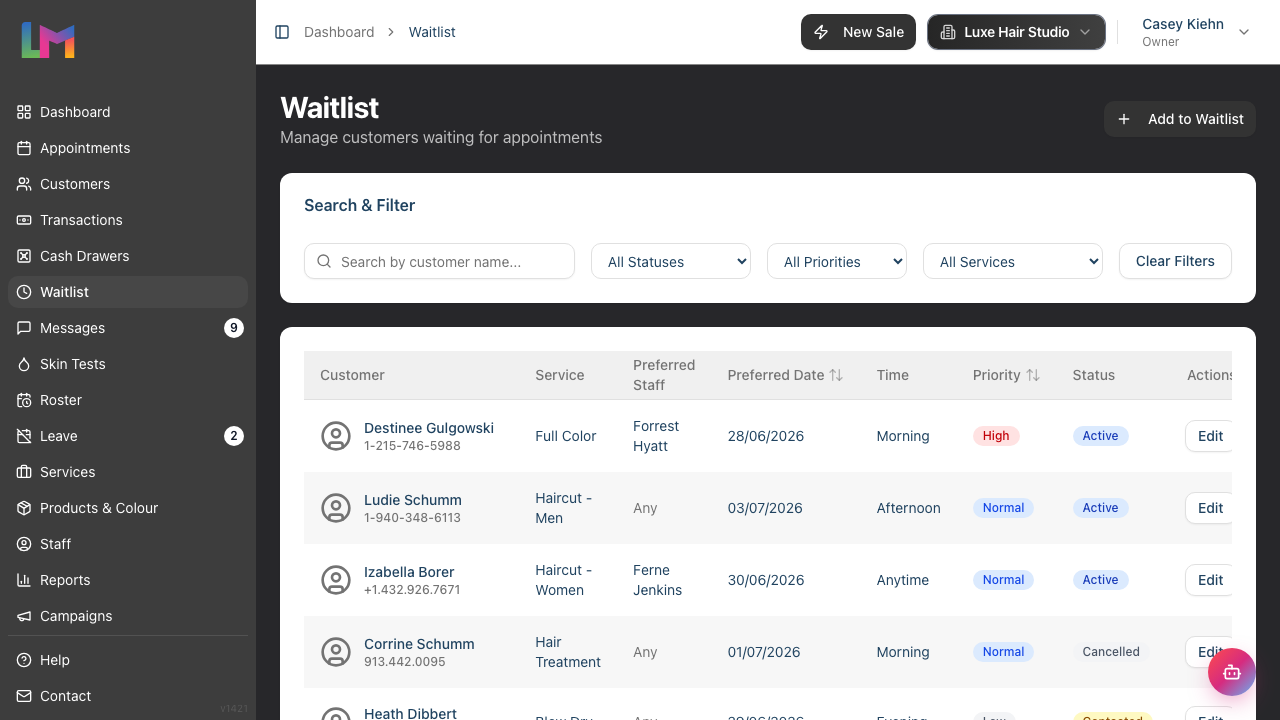
Waitlist management: Your waitlist becomes more valuable during peak times:
- Review the waitlist regularly
- Prioritise loyal/VIP customers
- Contact waitlist customers as soon as slots open
- Set the Priority field to High Priority for important customers so they stand out on the list
Step 5: Managing the Christmas Period
Christmas is typically the busiest time for UK salons. Here's a detailed approach:
Timeline:
| Weeks Before | Actions |
|---|---|
| 8 weeks | Staff availability check, initial roster planning |
| 6 weeks | Finalise rosters, communicate closures to customers |
| 4 weeks | Peak booking period begins, monitor capacity |
| 2 weeks | Final preparations, confirm all bookings |
| 1 week | Reminder messages, stock check, staff briefing |
Christmas roster planning:
- Determine salon hours for Christmas Eve, Christmas Day (usually closed), Boxing Day
- Check New Year's Eve and New Year's Day availability
- Discuss with staff their preferences (some want to work, others have commitments)
- Build the roster with agreed coverage
- Consider rotating who gets the most desirable days off
Gift voucher promotion: Christmas is peak time for gift voucher sales:
- Sell gift vouchers from the Gift Vouchers tab in Quick POS (the Sell Gift Voucher option)
- Consider promotional pricing or bonus offers
- Have physical gift cards or printed vouchers available if offered
- Track gift voucher sales to understand demand
Step 6: Wedding Season Preparation
Wedding parties often book months in advance and have specific requirements.
Wedding party bookings:
For bridal parties (bride, bridesmaids, mother of the bride):
- Create a single customer record for the bride
- Book appointments for each party member
- Consider blocking extended time for the group
- Note any special requirements (prosecco, photos, etc.)
- Require deposits for wedding bookings
Trial appointments: Most brides want a trial before the wedding:
- Book the trial 4-8 weeks before the wedding
- Link notes between trial and wedding day appointments
- Document exactly what was agreed at the trial
Wedding day logistics:
- Confirm the appointment a week before
- Note arrival time (often early morning)
- Plan for the group arriving together
- Prepare any extras (refreshments, atmosphere)
- Allow buffer time - weddings can be stressful
Step 7: Prom Season Management
Prom appointments are often concentrated in a short period.
Prom season characteristics:
- High demand for the same few evenings
- Young customers (may be less reliable)
- Often want multiple services (hair, makeup, nails)
- Parents may be paying/booking
Managing prom bookings:
- Require deposits - This is essential for young customers who may change plans
- Confirm parent contact - For under-18s, have a parent's contact number
- Book early - Popular slots fill months ahead
- Multi-service planning - If offering packages, ensure staff handovers are smooth
- Group bookings - Friends often want to come together
Timing considerations:
- Proms typically run June-July
- Most want appointments the afternoon of their prom
- Last-minute bookings are common as dates get confirmed late
- Be prepared for cancellations and changes
Step 8: Planning Marketing Campaigns
Use Luminate's data to inform your marketing.
Identifying campaign targets:
From Reports > Top Customers:
- Loyal customers who might book early
- High-value customers for VIP early access
- Customers due for a visit based on their usual frequency
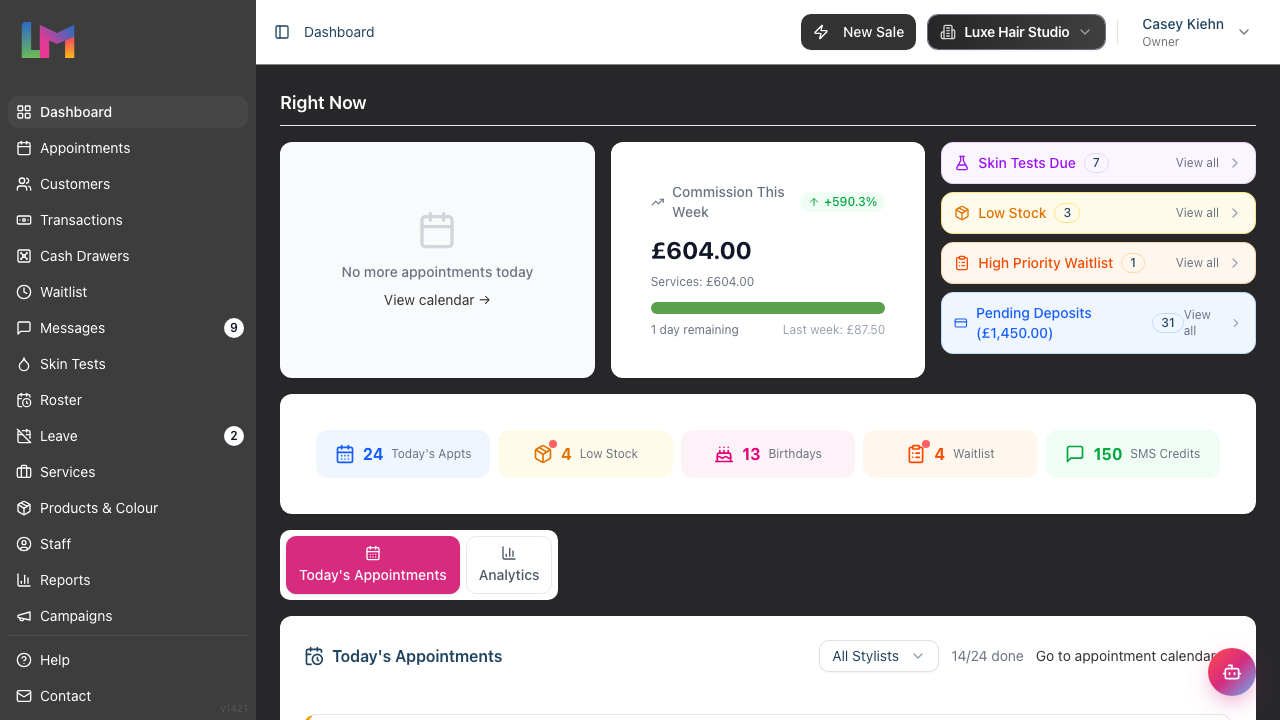
Birthday campaigns: The dashboard's Birthdays quick-stat tile shows how many customers have a birthday in the next 7 days; click it to open the customer list filtered to those birthdays:
- Contact customers before their birthday with offers
- Time campaigns for birthdays during quiet periods
- Use birthday promotions to fill gaps
Re-engagement campaigns: For customers who haven't visited recently:
- On the Customers list, filter by Not in 6+ Months to find lapsed customers
- Send targeted messages inviting them back
- Time campaigns for when you have capacity
Campaign execution via Messages:
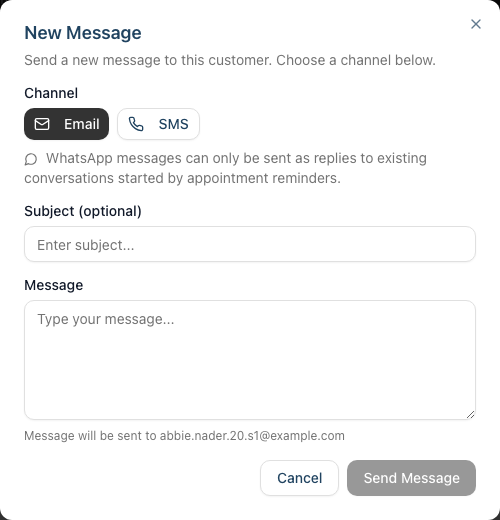
- Navigate to Messages in the sidebar
- Click New Message to compose a message to a customer
- Select the customer and choose the channel (Email or SMS)
- Personalise with customer names and relevant offers
- Track responses in the conversation history
Step 9: Post-Event Review
After peak periods, analyse what worked and what didn't.
Questions to answer:
| Question | How to Answer |
|---|---|
| Did we meet demand? | Compare bookings to capacity |
| What was our revenue? | Revenue reports for the period |
| Did we have no-shows? | Review appointment statuses |
| How did staff cope? | Team feedback and hours worked |
| What could we improve? | Document lessons learned |
Document for next year: Create notes about what worked well and what to change. Store these somewhere you'll find them next year (e.g., calendar reminder, notes in Luminate).
Seasonal Planning Checklist
Use this template 6-8 weeks before any peak period:
| Task | Timeframe | Done |
|---|---|---|
| Identify expected peak dates | 8 weeks before | ☐ |
| Review historical data | 8 weeks before | ☐ |
| Staff availability check | 8 weeks before | ☐ |
| Create preliminary roster | 6 weeks before | ☐ |
| Communicate closure dates | 6 weeks before | ☐ |
| Finalise roster | 4 weeks before | ☐ |
| Stock check and ordering | 4 weeks before | ☐ |
| Deposit policy communication | 4 weeks before | ☐ |
| Marketing campaign launch | 3 weeks before | ☐ |
| Appointment confirmations | 1 week before | ☐ |
| Staff briefing | 1 week before | ☐ |
Common Pitfalls
"We're overbooked and can't cope"
This happens when you don't limit bookings to capacity. Solutions: extend hours, add staff, or stop taking bookings when full. It's better to turn away bookings than deliver poor service.
"Staff are exhausted after the Christmas period"
Prevention is key: limit consecutive long shifts, schedule rest days, and consider closing a day or two after the peak for recovery. Staff burnout affects quality and retention.
"We had lots of no-shows despite being fully booked"
Require deposits during peak periods, especially for new customers. Send confirmation messages 48-72 hours before. Follow up on no-shows to understand why.
"We weren't prepared for how busy it got"
Start planning earlier next time. If this is your first peak season, talk to other local salon owners about what to expect. Historical data from Luminate will help in future years.
Tips and Best Practices
Start planning early - Peak periods can be anticipated months ahead. The more lead time, the better your preparation.
Communicate with customers - Let regulars know about busy periods. Many will book early when reminded.
Protect your team - Staff wellbeing affects service quality. Don't overwork your team even when demand is high.
Be realistic about capacity - It's better to serve fewer customers well than many customers poorly. Quality protects your reputation.
Learn from each peak - Document everything. Next year's planning is much easier with good notes.
Consider premium pricing - Some salons increase prices during peak periods. If you do, communicate this clearly.
Prepare for the dip - After peak periods, things quiet down. Plan promotions or marketing for the quiet period.
Stock up in advance - Ensure you have adequate products before the rush begins. Running out during Christmas is damaging.
Related Tutorials
- Tutorial 5.1: Setting Up Your Weekly Roster - Build effective rosters
- Tutorial 5.2: Managing Public Holidays and Bank Holidays - Handle closures
- Tutorial 2.3: Working with the Waitlist - Manage high-demand periods
- Tutorial 8.4: Deposits and Pre-Payments - Secure peak-period bookings
- Tutorial 10.1: Setting Up Appointment Reminders - Reduce no-shows
Frequently Asked Questions
How far in advance should I plan for Christmas?
Start 8 weeks before (so early November). Final rosters should be done by early December. Staff appreciate knowing their schedules well in advance.
Should I charge more during peak periods?
This is a business decision. If you do, be transparent with customers and communicate early. Some salons add a "festive" surcharge; others maintain standard pricing.
What if staff don't want to work during Christmas?
Have the conversation early and discuss fairly. Consider rotating who gets the most popular days off. Offer incentives for working peak shifts. Remember that some staff prefer working holidays.
How do I handle overbooking during peak times?
If you're fully booked and customers keep asking:
- Add them to the waitlist
- Be honest about availability
- Offer to notify them if cancellations occur
- Suggest alternative dates/times
- Never overbook beyond capacity
Should I restrict certain services during busy periods?
Some salons stop offering very long services (like corrections) during Christmas to see more customers. This is a valid strategy but communicate clearly to avoid disappointment.
Last Updated: January 2026