
Weekly Management Tasks
Tutorial 17.3: Weekly Management Tasks
Introduction
While daily routines keep your salon running smoothly, weekly reviews ensure you stay on top of staffing, performance, and forward planning. This guide covers the essential weekly management tasks that help you maintain control of your salon operations.
Setting aside dedicated time each week for these tasks prevents problems from accumulating and gives you the visibility needed to make informed decisions about your business.
Who this is for: Owners, Admins, and Managers responsible for salon operations.
What you'll learn:
- Reviewing and planning next week's roster
- Processing pending leave requests
- Analysing staff performance
- Following up on outstanding balances
- Reviewing gift voucher activity
- Managing the waitlist
- Checking upcoming appointments for issues
- Planning for the week ahead
Time to complete: 30-45 minutes (recommended: schedule this weekly)
Prerequisites
Before you begin, make sure you have:
- Access to Luminate with Manager, Admin, or Owner permissions
- Dedicated uninterrupted time (ideally at the end of the week or start of the new week)
- Previous week's notes or issues to follow up on
Step-by-Step Instructions
Step 1: Review and Plan Next Week's Roster
Ensuring adequate staffing is one of the most important weekly tasks.
- Click Roster in the sidebar menu
- Move to next week using the Next Week button (use Previous Week to go back, or This Week to jump straight to the current week). The date range for the week you're viewing is shown between the navigation buttons.
- Review the current state of next week's roster. The grid shows a row per staff member and a column per day, with each cell listing that person's shifts and a Total Hours column on the right:
- Are all expected staff members rostered?
- Do shift times align with anticipated appointment demand?
- Are there any gaps that need filling?
Duplicating from the current week:
If your roster follows a consistent pattern:
- Navigate to the current week (the week with the pattern you want to copy)
- Click Duplicate
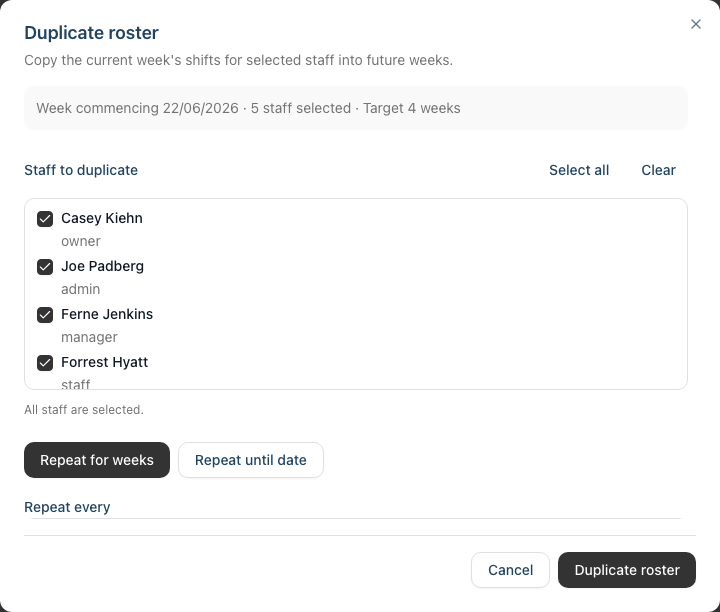
- In the Duplicate roster dialog that appears:
- Under Staff to duplicate, tick the staff members to include, or use Select all (use Clear to start again)
- Choose your duplication mode: Repeat for weeks or Repeat until date
- Set Repeat every to the interval you need (Every week, Every 2 weeks, Every 3 weeks, or Every 4 weeks)
- Enter the Number of weeks, or pick a Repeat until (inclusive) date
- Optionally tick Overwrite conflicting shifts if you want to replace existing shifts. When you do, a second confirmation tickbox appears acknowledging that existing shifts in the target weeks will be replaced — you must tick it to continue
- Review the summary line at the top of the dialog, which shows the week you're copying, how many staff are selected, and the target weeks
- Click Duplicate roster to confirm
Bank holiday considerations:
- Bank holidays are shown in the grid with a striped background on the relevant day
- If you try to roster a shift on a bank holiday — whether adding one manually or duplicating into a week that contains one — Luminate shows a Bank Holiday Warning. You can Cancel or Proceed Anyway
- Consider whether your salon is open on these days. See Tutorial 5.2 for managing which dates count as public holidays
Handling roster conflicts:
- If Overwrite conflicting shifts is left off (the default), any shift that clashes with an existing one is skipped, and Luminate reports back how many were skipped
- If you tick Overwrite conflicting shifts, the clashing shifts are replaced instead
- Always verify the roster after duplication
Step 2: Process Pending Leave Requests
Review and action all pending leave requests to give staff certainty.
- Click Leave in the sidebar menu
- Use the Status filter (options: All Statuses, Pending, Approved, Rejected, Cancelled) and select Pending
- Review each pending request. The list shows Staff, Type, Dates, Days, and a Status badge, with a View button to open the full request:
For each request, consider:
- Does the requested date clash with other approved leave?
- Will the salon have adequate cover on those dates?
- Is this a peak period (school holidays, Christmas)?
- How much notice has the staff member given?
- What's their remaining leave allowance?
To approve a request:
- Click View on the leave request to open its details
- Review the dates, type, and any notes from the staff member. The approval dialog also warns you if the leave clashes with existing appointments
- Click Approve
- Confirm the approval in the Approve Leave Request dialog that appears
To reject a request:
- Click View on the leave request to open its details
- Click Reject
- Enter a Rejection Reason explaining why (required — at least 10 characters). The staff member is notified of the reason
- Consider suggesting alternative dates if possible
Check leave allowances:
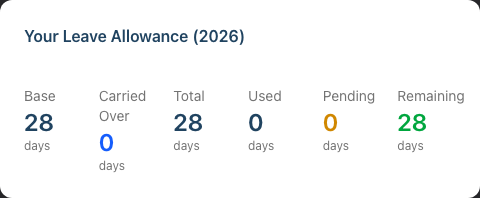
- The Leave page shows a Your Leave Allowance summary at the top with Base, Carried Over, Total, Used, Pending, and Remaining days. This reflects your own allowance — it does not change when you filter the list to another staff member
- For an overview of every staff member's balance, use the leave reports (see Tutorial 6.4)
- Be aware of staff approaching year-end with unused leave, and plan for carryover implications if your policy allows it
Step 3: Review Staff Performance
Weekly performance checks help you identify top performers and those who may need support.
- Click Reports in the sidebar menu
- Under Staff Reports, select Staff Performance
- Use the date range filter to set the period to the past week (or month for broader trends)
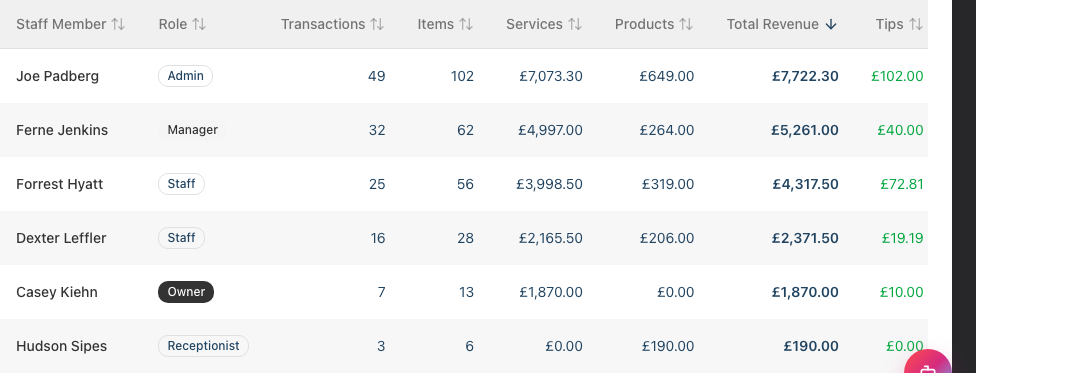
- Review the key columns:
| Column | What to Look For |
|---|---|
| Total Revenue | Which staff generated the most? Are targets being met? (Split into Services and Products) |
| Transactions | How many clients did each staff member see? |
| Tips | Are some staff consistently receiving more tips? |
| Commission | Is commission being calculated correctly? |
Summary cards above the table show Total Revenue, Avg per Staff, Total Tips, and Total Commission for the whole period. Use the Export button to download the data as CSV or PDF for your records.
Questions to consider:
- Is performance consistent with expectations and hours worked?
- Are there unexplained drops in performance?
- Do any staff members need additional training or support?
- Should you recognise or reward top performers?
Tip: Look at trends over multiple weeks rather than reacting to a single week's data. Everyone has good and bad weeks.
Step 4: Follow Up on Outstanding Balances
Customers with unpaid balances represent lost revenue. Weekly review keeps this under control.
- Click Reports in the sidebar menu
- Under Financial Reports, select Accounts Receivable
- Review the list of customers with outstanding amounts. The table shows Customer, Email, Phone, Unpaid (number of unpaid transactions), Outstanding (balance owed), Oldest Invoice, and Days Overdue. You can filter by minimum balance, days overdue, and number of unpaid invoices
Prioritise follow-up based on:
- Amount owed - Larger amounts warrant more attention
- Age of debt - Older debts are harder to collect
- Customer value - Regular customers may deserve more flexibility
- Upcoming appointments - You can collect when they next visit
Taking action: For customers with upcoming appointments:
- Make a note to collect the balance at their visit
- Consider requiring deposits for future bookings
For customers without upcoming appointments:
- Send a polite reminder message via the Messages feature
- Note any payment arrangements agreed
For very old or unlikely debts:
- Discuss write-off options with your owner/accountant
- Document the decision and reason
Running export for accounting: The Accounts Receivable report can be exported for your accountant or financial records. Click Export to download the outstanding balances as a CSV or PDF.
Step 5: Review Gift Voucher Activity
Gift vouchers represent both liability and opportunity. Weekly monitoring is important.
- Click Reports in the sidebar menu
- Under Financial Reports, select Gift Vouchers
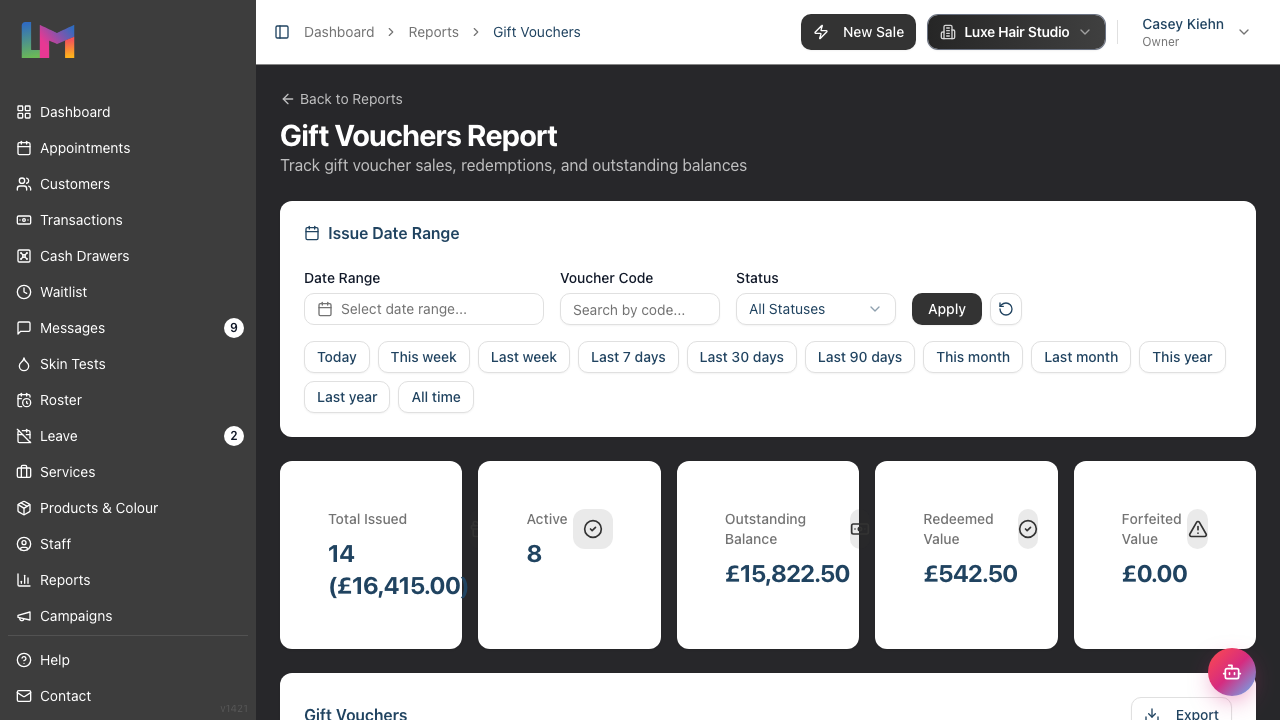
- Review the summary metrics:
- Total Issued - Count and total value of all vouchers issued
- Active - Number of vouchers currently valid and unredeemed
- Outstanding Balance - Total unredeemed voucher value (your liability)
- Redeemed Value - Total value that has been used
- Forfeited Value - Value from expired or cancelled vouchers
The table below lists each voucher with its Code, Status, Customer, Recipient, Initial Value, Balance, Forfeited amount, Issued date, and Expires date.
Things to watch for:
- Large outstanding balances (potential liability)
- Vouchers approaching expiry (opportunity to contact customers)
- Patterns in sales (popular as gifts at certain times)
For vouchers approaching expiry: There isn't a dedicated "expiring soon" figure, but you can sort or scan the Expires column to spot vouchers nearing their expiry date. Consider contacting customers with vouchers expiring in the next 30 days — a friendly reminder can drive bookings and ensure customers don't lose their value. Use the Status filter (Active, Redeemed, Expired, Voided) to focus on those still in play.
Step 6: Review the Waitlist
Your waitlist represents potential revenue. Weekly review ensures no opportunities are missed.
- Click Waitlist in the sidebar menu
- Review all active entries. Each row shows Customer, Service, Preferred Staff, Preferred Date, Time, Priority, and Status:
- Have any opportunities been missed?
- Are any entries stale, or past their preferred date?
- Are high-priority entries being actioned? (The dashboard also surfaces high-priority entries with how many days they've been waiting)
For entries that have been waiting a while:
- Consider proactively contacting them
- Review if their preferred staff/service/time is available
- Update or remove entries that are no longer relevant
Status management:
- Active - Still waiting for an appointment
- Contacted - You've reached out with an offer
- Converted - Successfully booked (set automatically when you create an appointment from the entry)
- Cancelled - Customer no longer wants the appointment
- Expired - Entry timed out
Step 7: Check Upcoming Appointments for Issues
Look ahead to identify and resolve potential problems.
- Click Appointments in the sidebar menu
- Switch between Day, Week, and List views and look through the upcoming week
- Look for:
- Colour services - Do they have valid skin tests?
- New customers - A First Visit badge can be added to appointments to flag first-time clients
- Complex bookings - Linked appointments show a small link icon indicating they're part of a group
- VIP customers - Any special requirements?
Skin test alerts: The dashboard's Skin Tests Due alert is the quickest way to spot customers needing a patch test. When you open or convert a colour appointment that requires a skin test, Luminate validates the customer's most recent test and warns you if it's missing, expired, or too recent. For those customers you may need to:
- Contact them to arrange a patch test
- Reschedule the appointment if there's not enough time
Step 8: Plan and Prepare for the Week Ahead
Finally, look at what's coming and prepare accordingly.
Questions to ask yourself:
- Is the roster adequate for the appointment volume?
- Are there any special events or promotions this week?
- Do we have adequate stock of products?
- Are there any birthdays to acknowledge?
- Have all pending leave requests been actioned?
Dashboard quick check: Return to the dashboard and review the quick-stats row — Today's Appts, Low Stock, Birthdays (customers with birthdays in the next 7 days), Waitlist, and SMS Credits (ensure you have credits for reminders) — along with the alerts panel, which highlights Skin Tests Due, Low Stock, High Priority Waitlist, and Pending Deposits.
Weekly Management Checklist
Use this checklist every week (recommended: Friday afternoon or Monday morning):
| Task | Location | Time |
|---|---|---|
| Review and plan next week's roster | Roster | 10 min |
| Process pending leave requests | Leave | 5 min |
| Review staff performance report | Reports > Staff Performance | 5 min |
| Follow up on outstanding balances | Reports > Accounts Receivable | 5 min |
| Review gift voucher activity | Reports > Gift Vouchers | 5 min |
| Review and clean up waitlist | Waitlist | 5 min |
| Check upcoming appointments for issues | Appointments | 5 min |
| Plan for the week ahead | Dashboard | 5 min |
Total time: approximately 45 minutes
Common Pitfalls
"I keep forgetting to do the weekly review"
Schedule a recurring calendar appointment for yourself. Many managers find Friday afternoon works well - you can address issues before the weekend, and the roster is prepared for the following week.
"Leave requests pile up and staff get frustrated"
Set an expectation with staff about response times (e.g., requests answered within 48 hours). The weekly review catches anything missed, but try to action requests as they come in.
"I don't know which outstanding balances to prioritise"
Focus on recent debts first - they're more likely to be paid. Also prioritise customers with upcoming appointments, as you can collect in person. Very old debts (90+ days) may be better written off.
"The roster duplication creates conflicts with existing shifts"
Always verify the target week before confirming duplication. If staff already have shifts on some days, decide whether to keep the existing shifts or overwrite them.
Tips and Best Practices
Block dedicated time - Don't try to squeeze weekly tasks between appointments. Schedule protected time for management activities.
Create a routine - Doing these tasks at the same time each week builds habits and ensures nothing is missed.
Document decisions - When you approve leave, address variances, or make roster changes, add notes. Future-you will appreciate the context.
Share insights with your team - If performance data shows opportunities or concerns, discuss them with staff. Celebrate successes and address issues constructively.
Track patterns, not just numbers - A single week of low performance might mean nothing. Three weeks of declining numbers is a pattern worth investigating.
Prepare for the following week's review - Keep notes during the week about issues that arise. This makes your weekly review more productive.
Related Tutorials
- Tutorial 5.1: Setting Up Your Weekly Roster - Master roster management
- Tutorial 5.2: Managing Public Holidays and Bank Holidays - Control which dates trigger warnings
- Tutorial 5.3: Duplicating and Managing Roster Patterns - Efficient roster planning
- Tutorial 6.3: Approving and Rejecting Leave Requests - Handle leave properly
- Tutorial 6.4: Leave Reports and Year-End Management - See every staff member's balance
- Tutorial 9.3: Staff Performance and Commission Reports - Analyse staff metrics
- Tutorial 9.5: Accounts Receivable and Outstanding Balance Reports - Manage debts
Frequently Asked Questions
When is the best time to do weekly management tasks?
Most managers find Friday afternoon or Monday morning works best. Friday lets you prepare for the following week. Monday lets you review the previous week with fresh eyes. Choose what works for your schedule.
What if I'm too busy to complete all the tasks every week?
Prioritise roster planning and leave requests - these affect staff directly and can't wait. The other tasks can be done less frequently if needed, but try not to skip them for more than two weeks.
Should I share performance data with staff?
This depends on your management style and culture. Some salons share rankings openly to encourage competition. Others prefer private conversations. Consider what motivates your team.
How do I handle a consistently underperforming staff member?
Weekly reports help you identify patterns, but addressing underperformance requires a separate conversation. Use the data to have a constructive discussion about what might be causing the issue and how to improve.
What happens if I reject a leave request and the staff member is upset?
Explain your reasoning clearly and sympathetically. If the rejection is due to business needs, suggest alternative dates. Document the reason so there's a clear record of the decision-making process.
Last Updated: January 2026