
Subscription Lifecycle - Trial, Grace Period, and Cancellation
Tutorial 14.3: Subscription Lifecycle - Trial, Grace Period, and Cancellation
Introduction
Understanding the complete subscription lifecycle helps you make informed decisions about your Luminate account. This guide explains what happens at each stage - from your initial trial through to paid subscription, and what occurs if you decide to cancel.
Knowing how trials, grace periods, and cancellations work ensures you never lose access unexpectedly and understand your options at every stage.
Who this is for: Salon owners who want to understand the full subscription journey and their options at each stage.
What you'll learn:
- How the free trial works and its limitations (including SMS restrictions)
- What happens when your trial ends
- How cancellation and the grace period work
- How to restore a cancelled subscription
Time to complete: 10-15 minutes
Prerequisites
Before you begin, make sure you have:
- A Luminate account with owner access
- Understanding of your current subscription status (see Tutorial 14.1)
Step-by-Step Instructions
Step 1: Understanding the Trial Period
When you sign up for Luminate, you get a 30-day free trial with access to most features. This gives you time to set up your salon and see how Luminate works before committing.
During your trial, you can:
- Create and manage multiple salons
- Add unlimited staff members
- Book appointments and process transactions
- Use all reports and analytics
- Send email notifications and reminders to customers
- Send email receipts to customers
Trial limitations: While most features are available during your trial, SMS messaging is restricted to prevent misuse:
- SMS appointment reminders - Not available during trial
- SMS marketing messages - Not available during trial
- Two-way SMS conversations - Not available during trial
- Email notifications - Fully available during trial
These SMS restrictions are lifted as soon as you add a payment method and convert to a paid subscription.
Note: Beta testers invited by Luminate are exempt from SMS restrictions during their trial period.
What you'll see:
- Your billing page shows status as "Trial"
- A countdown shows days remaining in your trial
- A trial banner may appear on dashboard pages reminding you to add a payment method
- If you try to send an SMS, you'll see a message explaining that SMS is not available during the trial period
Step 2: Converting to a Paid Subscription
To continue using Luminate after your trial ends:
- Go to the billing page
- Click Add Payment Method
- Enter your card details in the secure payment portal
- Complete the payment setup
What happens next:
- Your status changes to "Active"
- You're charged for your first month based on your salon count
- Future payments occur automatically on your billing date
- You receive full, uninterrupted access to Luminate
Step 3: Understanding What Happens If You Don't Add Payment
If your trial ends without a payment method:
| Day | What Happens |
|---|---|
| Trial ends | Account enters Grace Period |
| Grace Period | You have read-only access for 90 days |
| Day 90 | Account enters Pending Deletion status |
| After 90 days | Account and all data permanently deleted |
During the grace period:
- You can view all your data (appointments, customers, transactions, reports)
- You cannot create or edit anything
- A warning banner appears throughout the application
- You receive email reminders at 90, 60, 30, 14, 7, 3, and 1 day(s) before deletion
Step 4: Cancelling Your Subscription
If you decide to cancel your paid subscription:
- Go to the billing page
- Scroll to the red-bordered Cancel subscription panel at the bottom of the page and click Cancel subscription
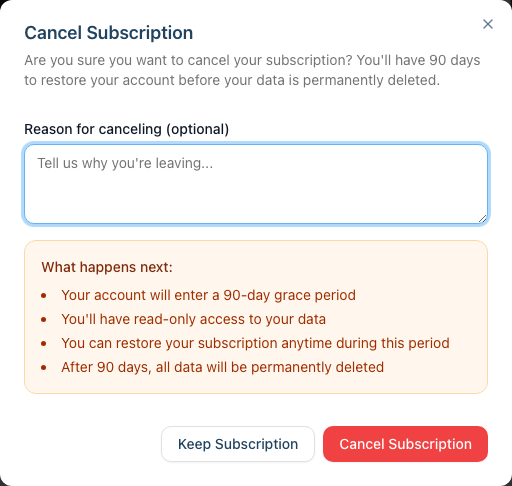
- A confirmation dialog appears with a What happens next summary (90-day grace period, read-only access, restore option, deletion after 90 days)
- Optionally enter a reason for cancelling (helps us improve)
- Click Cancel Subscription to confirm (or Keep Subscription to back out)
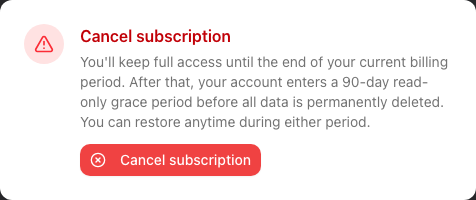
What happens when you cancel:
| Subscription Type | What Happens |
|---|---|
| Paid (Active) | Access continues until end of current billing period, then grace period begins |
| Trial | Grace period begins immediately |
During the cancellation process:
- A warning banner shows your cancellation status
- You'll see how many days remain before the grace period starts
- You can still use Luminate normally until the billing period ends
Step 5: Restoring a Cancelled Subscription
Changed your mind? You can restore your subscription at any point before deletion:
If cancelled but still in billing period (Active status):
- Go to the billing page
- Click Restore Subscription
- Your cancellation is immediately reversed
- Billing continues as normal
If in Grace Period:
- Go to the billing page
- You'll see a prominent warning about pending deletion
- If you have a payment method on file: Click Restore Subscription
- If no payment method: Click Add Payment to Restore, then complete payment setup
- Once restored, your status returns to "Active" and full access is restored
What happens when you restore:
- Your status immediately changes back to "Active"
- Read-only restrictions are lifted
- Your data remains intact
- Billing resumes as normal (if you were in the grace period, your account returns to Active and paid billing continues)
- A "Subscription Restored" event appears in your billing history
Step 6: Understanding the Complete Lifecycle
Here's the complete subscription journey:
Sign Up → Trial (30 days)
    ↓
    ├── Add Payment → Active (paid monthly)
    │                     ↓
    │                 Cancel → Active until period end → Grace Period (90 days) → Deletion
    │                     ↑           ↑                          ↑
    │                   Restore     Restore                    Restore
    │
    └── No Payment → Grace Period (90 days) → Pending Deletion → Permanent Deletion
                          ↑
                        Restore (add payment)
Key points:
- You can restore at any point before permanent deletion
- Once deleted, data cannot be recovered
- Restoring from grace period requires adding a payment method
- You receive multiple email warnings before deletion
Common Pitfalls
"I can't send SMS messages to my customers"
During the trial period, SMS messaging is disabled. This includes appointment reminders, marketing messages, and two-way conversations. Email notifications work normally during the trial. To enable SMS, add a payment method to convert to a paid subscription.
"I cancelled but I'm still being charged"
If you cancel a paid subscription, you retain access until the end of your current billing period. The cancellation takes effect at period end - you won't be charged again, but you've already paid for the current period.
"I can't make any changes to my salon"
If you're seeing errors when trying to create or edit records, check your subscription status. During the grace period, you have read-only access. Add a payment method and restore your subscription to regain full access.
"I missed the deletion emails and lost my data"
Unfortunately, once an account is deleted, data cannot be recovered. We send reminders at 90, 60, 30, 14, 7, 3, and 1 day(s) before deletion. Check your spam folder and ensure your email address is current to receive these notifications.
"I want to cancel but keep my data for later"
You have 90 days in the grace period to restore your subscription. During this time, all your data is preserved in read-only mode. After 90 days, data is permanently deleted. We cannot hold data beyond the grace period without an active subscription.
Tips and Best Practices
Add a payment method early - Even if you're not sure, adding a payment method prevents accidental service interruption. You can always cancel later.
Need more trial time? Get in touch - The 30-day trial isn't self-extendable from the billing page. If you need longer to evaluate Luminate (for example, if key team members are on holiday during your initial trial), contact hello@luminate.salon to discuss your options.
Don't wait until the last day to cancel - If you're sure you want to cancel, do it early. You won't lose access immediately, and it gives you time to export any data you need.
Check your email regularly - Billing notifications and deletion warnings go to your account email. Keep it current and check spam folders.
Export important data before grace period ends - During the grace period, you can still view and export your data. Don't wait until the last minute.
Related Tutorials
- Tutorial 14.1: Understanding Your Luminate Subscription - Subscription overview and pricing
- Tutorial 14.2: Managing Payment Methods and Billing - Adding and updating payment methods
- Tutorial 12.4: Importing and Exporting Data - How to export your data before cancellation
Frequently Asked Questions
Why can't I send SMS messages during my trial?
SMS messaging is disabled during the trial period to prevent misuse of the service. Email notifications work normally, so your customers can still receive appointment reminders and receipts via email. Once you add a payment method and convert to a paid subscription, SMS messaging is immediately enabled.
Can I pause my subscription instead of cancelling?
Currently, Luminate doesn't offer a pause feature. If you need a break, you can cancel and then restore within the 90-day grace period without losing data. You won't be charged during the grace period.
What data is deleted when my account is permanently deleted?
All data associated with your account is permanently deleted, including:
- All salon information
- All customer records
- All appointments (past and future)
- All transactions and financial records
- All staff accounts linked to your salons
- All reports and analytics history
- All notification templates and settings
Can I get a refund if I cancel mid-month?
Luminate bills monthly in advance. If you cancel mid-month, you retain access until the end of your paid period but do not receive a prorated refund. Contact hello@luminate.salon to discuss exceptional circumstances.
What if I want to come back after my account was deleted?
You can create a new account at any time, but you'll start fresh. Deleted data cannot be recovered, so you'll need to set up your salons, services, staff, and customers again from scratch.
Do staff accounts get deleted too?
Yes. When your owner account is deleted, all staff accounts associated with your salons are also deleted. Staff members who had login access will no longer be able to access Luminate.
How do I know how many days I have left?
The billing page shows:
- Trial: Days remaining until trial ends
- Grace Period: Days remaining until deletion
Additionally, warning banners appear throughout the application during critical periods.
Can I extend the grace period?
The 90-day grace period is fixed and cannot be extended. If you need more time, add a payment method to restore your subscription. You can then cancel again if needed, which starts a new grace period after your paid period ends.
What happens to online bookings if I'm in the grace period?
During the grace period, your online booking page (if enabled) will be disabled. Customers will not be able to book new appointments. Restore your subscription to re-enable online booking.
Last Updated: January 2026