
Understanding Your Luminate Subscription
Tutorial 14.1: Understanding Your Luminate Subscription
Introduction
Luminate is a subscription service that charges per salon per month. This guide explains how your subscription works, what's included in your plan, and how to view your current subscription status. Understanding your subscription helps you plan for costs and ensures uninterrupted access to all Luminate features.
Whether you're on a free trial or an active paid subscription, the billing page gives you a clear overview of your current plan, pricing, and upcoming charges.
Who this is for: Salon owners who want to understand their Luminate subscription and billing.
What you'll learn:
- How to access the billing page
- Understanding your subscription status and what each status means
- Reading your plan details (pricing, salon count, billing dates)
- Viewing your billing history and events
Time to complete: 5-10 minutes
Prerequisites
Before you begin, make sure you have:
- A Luminate account with owner access (only owners can view billing)
- An active subscription (trial or paid)
Step-by-Step Instructions
Step 1: Access the Billing Page
The billing page is only available to salon owners. To access it:
- Click your name in the top-right corner of the header
- Select Billing from the dropdown menu
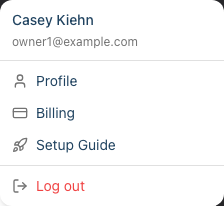
You'll be taken to the Billing page, which displays all your subscription information.
Step 2: Understanding the Billing Page Layout
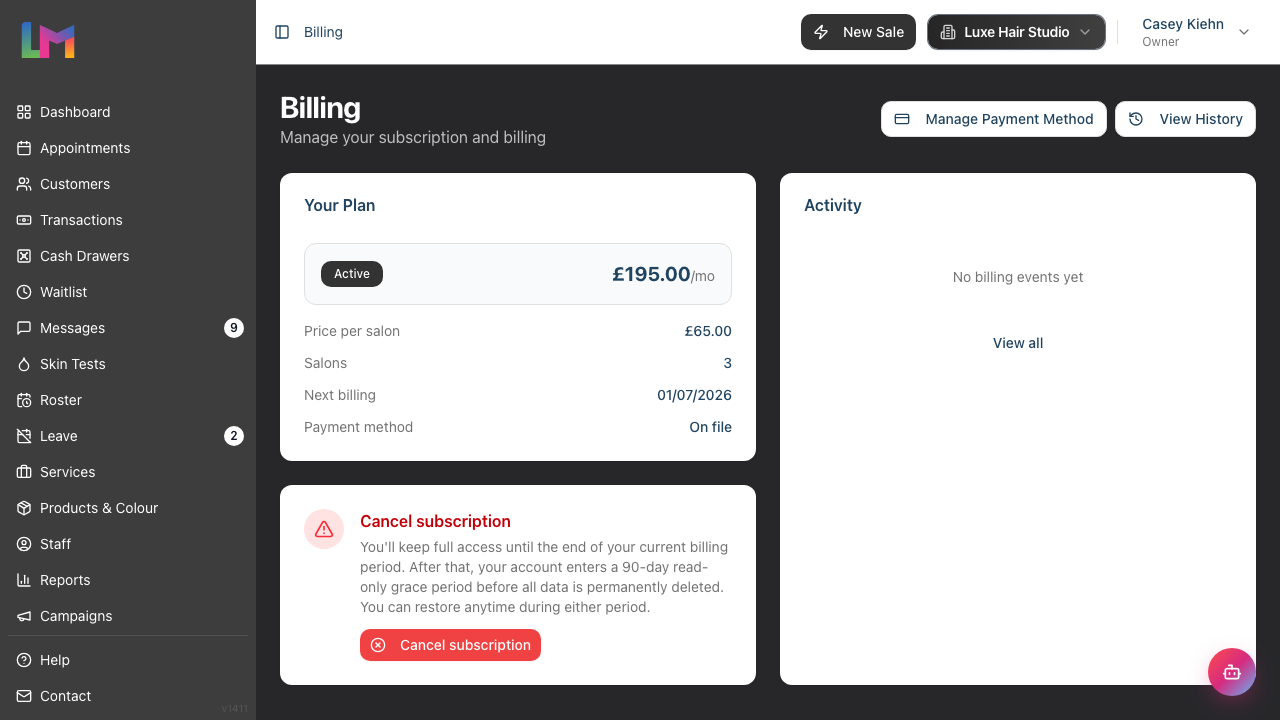
The billing page is organised into a few clear areas:
| Area | What It Shows |
|---|---|
| Page header | The page title, plus action buttons — View History, and (once you have a payment method) Manage Payment Method |
| Status banners | Context-sensitive alerts that only appear when relevant — for example a trial countdown, a "payment failed" warning, or a grace-period notice |
| Your Plan | Your subscription status, monthly cost, price per salon, salon count, key dates, and whether a payment method is on file |
| Activity | A short feed of your most recent billing events, with a View all link to the full history |
If online payments haven't been switched on for your account yet, the page instead shows a "Billing is not available yet" message — your trial and access continue as normal in the meantime.
Step 3: Understanding Subscription Statuses
Your subscription can be in one of several states, shown as a coloured badge on the Your Plan card:
| Status | What It Means |
|---|---|
| Trial | You're in your initial 30-day free trial period |
| Extended Trial | You've used your one-time trial extension, giving you extra evaluation time |
| Active | You have a paid subscription with a valid payment method |
| Past Due | A payment has failed — update your payment method to continue |
| Grace Period | Your subscription was cancelled but you still have read-only access |
| Pending Deletion | Your account is scheduled for permanent deletion |
If you cancel an active paid subscription, it stays Active until the end of your current billing period — the page shows an "Access until" date and a Restore Subscription button so you can change your mind before the grace period begins.
Step 4: Reading Your Plan Details
The Your Plan card summarises your subscription. At the top, a summary strip shows your status badge and the headline figure for your current state — for an active plan that's your total monthly cost (for example, £195/mo); on trial it's the number of days left.
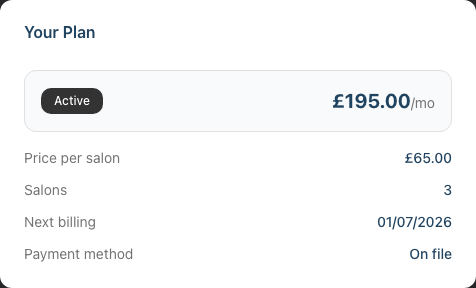
Below the strip, the detail rows adapt to your status. You may see:
- Price per salon — the amount charged for each salon location
- Salons — how many salons are on your account
- Next billing — when your next payment will be taken (active subscriptions)
- After trial / Trial ends — your monthly cost once the trial ends and the trial end date (during a trial)
- Access until / Data deletion on — the relevant date if you've cancelled or are in a grace period
- Payment method — whether a card is On file or Not added
Note: Your total monthly cost is simply your price per salon multiplied by your number of salons. The example above shows an existing account on a grandfathered rate of £65 per salon across 3 salons (£195/month). New accounts are charged the current prices shown in Step 6.
For active subscriptions, a Cancel subscription panel also appears beneath the Your Plan card, explaining what happens if you cancel.
Step 5: Viewing Billing History
The Activity card on the right shows your most recent billing events. To see a complete history:
- Click View History in the top-right of the billing page, or
- Click View all at the bottom of the Activity card
The Billing History page lists every billing event, newest first, including:
- Trial started / extended / expired
- Payments succeeded / failed
- Subscription created / updated / cancelled / restored / past due / ended
- Grace period started
- Deletion scheduled / account deleted
- Salons added / removed
Each event shows:
- The event type (e.g., "Trial Started", "Payment Succeeded")
- The date and time
- Any status change (e.g., Trialing → Active), shown as badges
- Payment amounts, where applicable
Step 6: Understanding Pricing
Luminate uses simple, transparent per-salon pricing. These are the current prices for new sign-ups:
| Currency | Price per Salon/Month |
|---|---|
| GBP | £69 |
| EUR | €75 |
| USD | $90 |
Key pricing points:
- You're billed monthly for each active salon
- Your currency is set when you sign up and cannot be changed
- Adding more salons increases your monthly cost automatically
- Existing customers keep their original price even if prices increase (grandfathered pricing) — so the rate on your plan may differ from the table above
Common Pitfalls
"I can't find the Billing option in the menu"
Only salon owners can access billing. If you're logged in as a staff member (Admin, Manager, Staff, or Receptionist), you won't see the Billing option. Contact your salon owner for billing queries.
"My status shows Past Due"
This means a payment attempt failed. Go to the billing page and use Update Payment Method to add a valid card. Once payment succeeds, your status will return to Active.
"I'm on trial but want to switch to a different currency"
Your billing currency is set when you create your account based on your location. Contact support at hello@luminate.salon if you need to discuss currency options before your trial ends.
Tips and Best Practices
- Check your billing page regularly - Especially as your trial end date or next billing date approaches
- Keep your payment method up to date - An expired card will cause payment failures and service interruption
- Plan for growth - Each new salon adds to your monthly cost, so budget accordingly
- Make the most of your trial - Use the 30-day trial period to fully set up and evaluate Luminate before committing
Related Tutorials
- Tutorial 14.2: Managing Payment Methods and Billing - Learn how to add and update payment methods
- Tutorial 14.3: Subscription Lifecycle - Trial, Grace Period, and Cancellation - Understand the complete subscription journey
- Tutorial 12.1: Multi-Salon Management for Owners - Managing multiple salon locations
Frequently Asked Questions
How long is the free trial?
The initial free trial is 30 days. You can extend it once by an additional 30 days, giving you up to 60 days total to evaluate Luminate.
Can I add salons during my trial?
Yes, you can add multiple salons during your trial period. When you convert to a paid subscription, you'll be billed for all active salons.
What happens if I don't add a payment method before my trial ends?
Your account will enter a grace period where you have read-only access. You can view your data but cannot make changes. After 90 days in grace period, your account and all data will be permanently deleted.
Can I downgrade if I close a salon?
Yes. When you remove a salon from your account, your monthly cost decreases automatically at the next billing cycle.
Do you offer annual billing?
Currently, Luminate bills monthly only. Contact hello@luminate.salon if you're interested in annual billing options.
Is VAT/tax included in the prices?
Pricing and tax treatment depends on your location and business status. The amounts shown on your billing page are the amounts you'll be charged. Check with your accountant for tax implications in your jurisdiction.
Last Updated: January 2026