
Hiding Customer Contact Details from Staff
Introduction
Your customer records hold email addresses, phone numbers, home addresses and dates of birth. Every stylist with a login can read all of it. For most salons that is exactly right — the person doing the colour is often the person who rings to move an appointment.
Some salons would rather their stylists did not hold that information. It might be a condition of an insurance policy, a response to a client's request, or simply a decision that contact details belong to the salon and not to whoever is on the floor.
Luminate lets you hide those details from your Staff-role team members, one salon at a time. It is off until you turn it on, and it changes nothing else: a stylist with contact details hidden can still message the client, still take their booking, and still ask them to update their own details.
Who this is for: Salon owners and administrators.
What you'll learn:
- What a Staff-role team member sees when the setting is on
- What still works, and why
- How to turn it on and off
- How a stylist gets a client's details updated without seeing them
- Who the setting does and does not affect
Time to complete: 5-10 minutes
Prerequisites
Before you begin, make sure you have:
- Owner or Admin role
- A moment to tell your team, so a stylist does not think the app has broken
What the Setting Does
With the setting on, a Staff-role team member sees this on every screen that shows a customer:
| Field | What they see |
|---|---|
j*******@example.com — the first letter and the domain |
|
| Phone | ***7321 — the last four digits |
| Address | Hidden by your salon |
| Date of birth | Hidden by your salon |
Names, allergies, notes, badges, colour history and appointment history are untouched. A stylist needs those to do the work, and none of them is contact data.
The last four digits of the phone number are deliberate. A client rings, gives their number, and the stylist can still confirm they are looking at the right record — without holding the number itself.
What Still Works
This is the important part to tell your team. Hiding a phone number does not stop a message reaching it.
Messaging still works. A stylist can send an SMS, an email or a WhatsApp message from the customer's record or the messaging inbox. Luminate knows the real address and number; the stylist does not need to.
Reminders and confirmations still go out. Nothing about automatic messages changes.
Bookings, sales and colour work are unaffected. So are receipts sent to a client by email.
Asking a client to update their own details still works. The Request Update button on a customer's record sends the client a link — by email, by SMS, or as a QR code to scan at the desk. The client fills in their own details. The stylist never sees a value, and the link cannot be used to read one.
Five things a Staff-role member cannot do while the setting is on:
- Copy an email address or phone number to the clipboard. The copy buttons are not shown.
- Tap a number to dial it, or an address to write to it. Those are plain text, not links.
- Edit any of the four hidden fields. The customer edit form shows them as read-only.
- Search on part of a number or address. A whole number finds the client; four digits find nothing.
- Sort the customer list by email, phone or birthday, or filter it to this week's birthdays. The dashboard's Birthdays tile is hidden from them too.
Turning It On
- Go to Settings for the salon.
- Open the Data tab.
- Open the Privacy sub-tab.
- Switch on Hide contact details from Staff.
- Save.
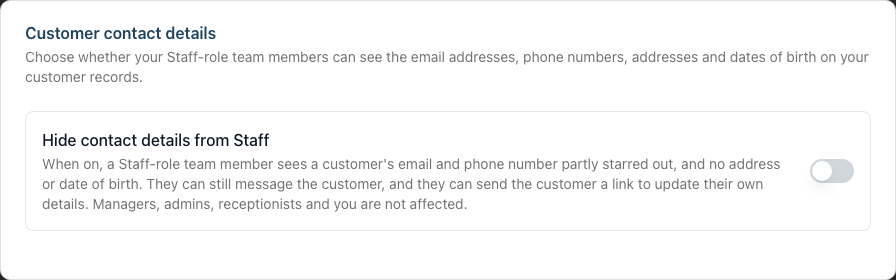
The change applies straight away, to that salon only. If you run more than one salon, each one has its own setting.
To turn it off, switch it off and save. Nothing was deleted — the details were always there, and they come back into view for everyone.
What a Stylist Sees
On a customer's record, a Staff-role team member sees the name, badges, allergies, notes and history exactly as before. In place of the contact details:
- Email reads
j*******@example.com, as plain text. There is no copy button and clicking it does nothing. - Mobile Number reads
***7321, the same way. - Address and Date of Birth read "Hidden by your salon".
- The Email bounced badge still appears if that address is failing.
The Request Update button at the top of the record is how they get a wrong number fixed.
On the customer's edit form, those four fields appear as read-only lines with the same note. Everything else on the form — name, allergies, badges, referral source, communication preferences — stays editable.
Who It Affects
| Role | Affected? |
|---|---|
| Owner | No |
| Admin | No |
| Manager | No |
| Receptionist | No |
| Staff | Yes, when the setting is on |
The setting names the Staff role, not individual people. If one stylist needs full access, give that person a different role — a Manager or a Receptionist, depending on what else they do. See Section 4: Staff Management for what each role can do.
An Owner or an Admin can turn the setting on and off. A Staff-role member cannot see the setting at all.
Common Questions
A stylist says a client's number has changed. What do they do?
Open the customer's record and use Request Update. The client gets a link and enters the new number themselves. It is more reliable than a number read out over a noisy salon, and the record ends up right.
Can a stylist still see whether a client's email is bouncing?
Yes. The Email bounced badge still appears on the customer's record. The technical detail behind it is hidden, because it usually quotes the address.
What happens when a stylist charges a fee to a client who cannot be messaged?
The fee is still saved, and Luminate tells the stylist to call the client and ask if they can be messaged. For a stylist with contact details hidden, that sentence leaves out the phone number.
What about a gift voucher recipient?
The same rule applies. A stylist selling a voucher types the recipient's email or phone in as normal, and Luminate stores it — but they cannot read it back afterwards, and saving a sale cannot overwrite what a colleague entered.
Does searching still find a customer by phone number?
Yes, if the stylist types the whole number. A client reads it out, the stylist searches on it and finds the record — with or without the country code. This is deliberate: answering the phone is part of the job.
What does not work is searching on part of a number or part of an address. Four digits on their own find nothing. Otherwise a stylist could type the four digits the mask shows, then try each digit in front of it and watch which one keeps the client in the results — and rebuild the whole number that way. Searching by name is unchanged.
Why can't a stylist sort the customer list by email, phone or birthday?
Because sorting a list by a column puts the values in order, which answers the question just as well as reading them. With the setting on, those three column headings are plain labels rather than sort controls, the Upcoming (7 days) birthday filter is not offered, and the Birthdays tile is missing from their dashboard. In a small salon, "1 birthday this week" next to a short list of clients is the date.
Does the in-app assistant know the details?
No. Lumen answers a Staff-role member the same way the screens do — masked values, and no searching on part of a number.
What about the birthday message in the inbox?
If you send automatic birthday messages, that message sits in the client's thread with the date it went out, and your team can read the inbox — that is the point of it. So a stylist could work out a birthday from the thread. If that matters to your salon, turn the birthday reminder off; hiding the message would mean hiding half the conversation.
Does this affect the online booking pages?
No. Those pages are for your clients, and they only ever show a client their own details.
Next Steps
- Tutorial 11.2: GDPR Compliance — your wider data-protection obligations
- Tutorial 11.3: Managing Customer and Staff Data Retention — removing personal data when you no longer need it
- Tutorial 3.3: Customer Preferences and Communication Consent — what a client can change about themselves